Quek Sze Long's Project Portfolio Page
Project: HeRon
HeRon is a desktop application for HR managers of Small-Medium Enterprises (SMEs) to assist in managing HR administrative tasks such as tracking leaves and offs, calculating pay and updating payroll information. It is optimized for use via a Command Line Interface (CLI) while still having the benefits of a Graphical User Interface (GUI).
HeRon is a project adapted from AddressBook - Level 3.
Given below are my contributions to the project.
-
New Feature: Added a start payroll command to calculate the pay of all employees.
- Justification: This feature is important for the target users, HR managers, as one of their major tasks is to
compute payroll. This helps users to complete calculations easily.
- Justification: This feature is important for the target users, HR managers, as one of their major tasks is to
compute payroll. This helps users to complete calculations easily.
-
New Feature: Enhanced the pay command to allow the user to pay all employees in the filtered list at once.
- Justification: In a company, it is likely that the user (HR managers) would pay multiple employees at once, and the original pay command only pays one employee at a time. This enhancement greatly improves the convenience of keeping track of which employees have been paid.
- Highlights: The implementation turned out to be challenging, as possible interactions with other commands such as
startPayroll and addHoursWorked had to be considered. As a result, more integration testing had to be done.
-
New Feature: Added an overtime pay rate attribute in the user preferences.
- What it does: The overtime pay rate is used in payroll calculations as an additional salary multiplier for overtime work done.
- Justification: Users are unlikely to change the overtime pay rate of their company very often, hence setting it to be in the user preferences allows users to change the rate and the information will be retained, improving convenience.
- Highlights: It was slightly challenging to decide how to store the overtime pay rate attribute. After deciding on
adding it as an attribute to the user preferences, a number of refactoring also had to be done to various child
classes.
-
Code contributed: RepoSense link
-
Contribution to Documentation:
- User Guide:
- Developer Guide:
-
Contribution to team-based tasks:
- Tracked progress on team tasks on the tP dashboard
- Updated team repo documents to remove mention of AB-3 during set-up
- Submitted product concept to TEAMMATES and updated in the documentation
- Managed issues tracking from PE-D for v1.4.
- Made group progress report regarding PE-D bug triaging progress.
- Formatted the User Guide to be PDF-friendly
- Tracked progress on team tasks on the tP dashboard
-
Review Contributions:
- Main reviewer for @onewaykiat’s pull requests.
Contributions to the Developer Guide (Extracts):
Start Payroll feature
The start payroll feature is provided through StartPayrollCommand.
It extends Command with the following added methods to calculate the payroll for every employee:
-
StartPayrollCommand#calculatePay(HourlySalary salary, HoursWorked hoursWorked,
Overtime overtime, OvertimePayRate overtimePayRate)
- Calculates the payroll based on the given parameters and returns a newCalculatedPayobject. -
StartPayrollCommand#createPersonWithCalculatedPay(Person personWithCalculatedPay,
CalculatedPay newCalculatedPay)
- Creates a newPersonthat is a copy of the givenPersonparameter except with the updatedCalculatedPayvalue. -
StartPayrollCommand#createPersonWithZeroHoursWorkedAndOvertime(Person person)- Creates a newPersonthat is a copy of the givenPersonparameter except with theHoursWorkedandOvertimevalues set to 0.
…
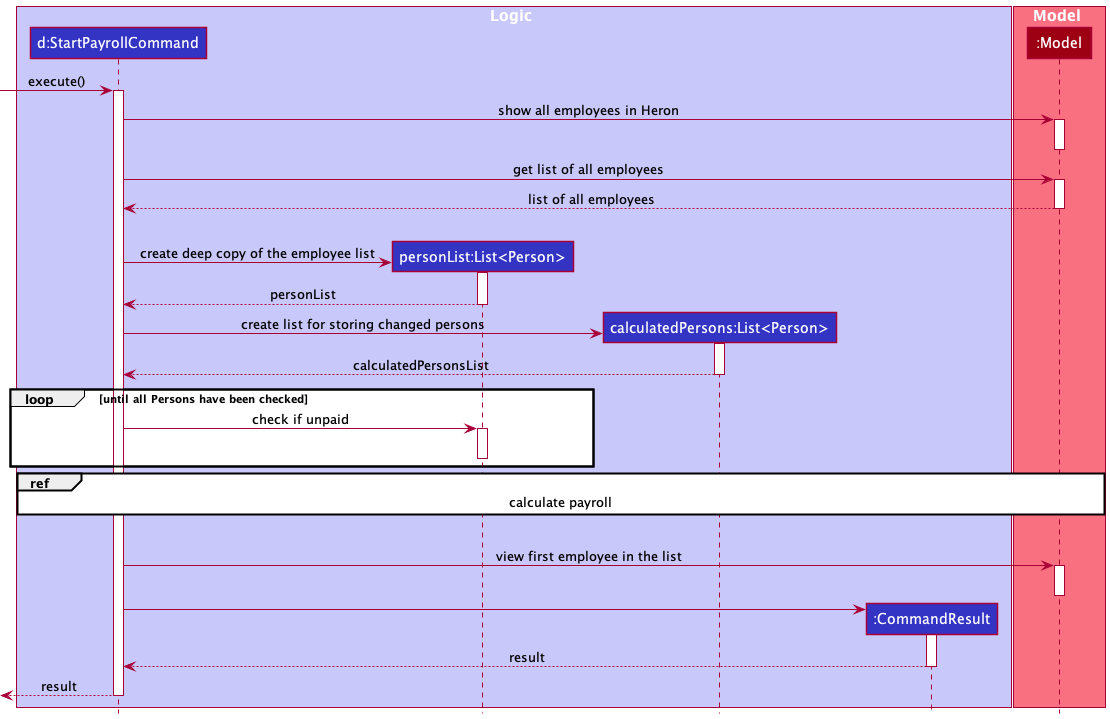
The following sequence diagram describes the operations in executing a StartPayrollCommand.
Contributions to the User Guide (Extracts):
Start Payroll : startPayroll
Calculates the payroll of all employees and mark them as awaiting the payment.
The payroll formula is: HOURSWORKED * HOURLYSALARY + OVERTIME * HOURLYSALARY * OVERTIMEPAYRATE,
where OVERTIMEPAYRATE is the added pay rate for overtime as compared to normal work hours.
It can be viewed through the viewOvertimePayRate command or changed through the setOvertimePayRate command.
Format: startPayroll
- Calculates the payroll of all employees regardless of current viewing list based on the formula above.
- After that, marks all employees as awaiting payment of the calculated amount.
This will produce red labels under each employee data stating ‘NOT PAID’ and the amount they are owed. - The number of hours worked and overtime hours worked for the employee will be reset to 0 as well so that hours counting towards the next payroll can continue to be added.
- Finally, display the list of all employees.
- This command is typically followed up by
paycommands to mark employees as paid, after their salaries are given in real life.
…
 Notes:
- All employees must not have any pay pending from the previous payroll (i.e. no red ‘NOT PAID’ label). Otherwise, an error will be thrown and no action will be taken.
- To start a new payroll, first make sure to pay all employees using the
paycommand.